
!#Pink-Ruby#!

!#Pink-Ruby#!

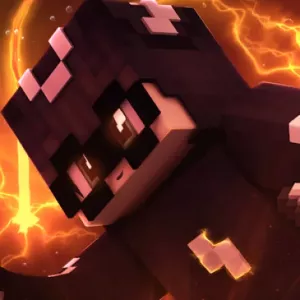
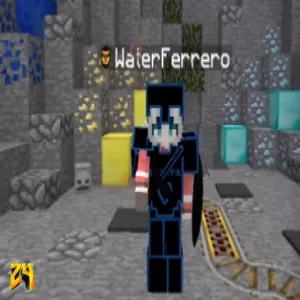
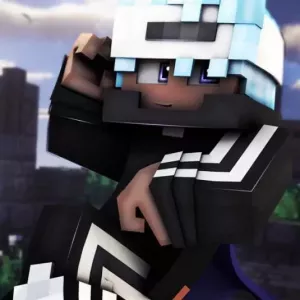
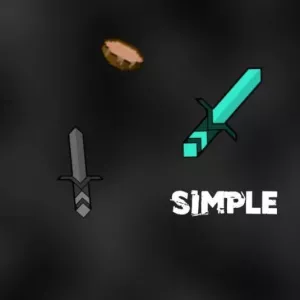
PT-BR: Uma textura feita principalmente para SkyWars mas pode ser utilizada para outro tipo de jogos! EN: A texture made mainly for SkyWars but can be used for other games! Feita por/Made by: Rubi <3

Downloads

37

Advertisement

!#Pink-Ruby#!

!#Pink-Ruby#!

Creator
Ruby
Beschreibung

PT-BR: Uma textura feita principalmente para SkyWars mas pode ser utilizada para outro tipo de jogos! EN: A texture made mainly for SkyWars but can be used for other games! Feita por/Made by: Rubi <3

Hochgeladen am
30.08.2020
Versions

All

Resolutions

All

Tags
Teilen
Discord
Link zum teilen
Download (8.77MB)
Weitere tolle Minecraft Resourcepacks
mxlte78 1K
mxlte78 1K
3 Rezensionen
  • Creator: skypower ADMINISTRATOR Resourcepacks24 1.000.000 Downloads
  • Downloads : 4.398
  • Hochgeladen am : 06.09.2020
Sayota 50subs Pack
Sayota 50subs Pack
  • Creator: SayotaYT
  • Downloads : 1.138
  • Hochgeladen am : 06.05.2023
luqaz-V6
luqaz-V6
1 Rezension
  • Creator: luqaz
  • Downloads : 1.097
  • Hochgeladen am : 20.08.2018
sencillo
sencillo
  • Creator: simuaa
  • Downloads : 3.064
  • Hochgeladen am : 22.01.2016
SmoothGreenEdit
SmoothGreenEdit
2 Rezensionen
  • Creator: Damian
  • Downloads : 3.130
  • Hochgeladen am : 25.03.2016
Hypixel Skyblock Pack V13 16x 1.8.9
1 Rezension
  • Creator: Fraustiz
  • Downloads : 3.969
  • Hochgeladen am : 10.02.2021
LSD-Stick [Addon]
LSD-Stick [Addon]
  • Creator: CedGamesYT
  • Downloads : 1.304
  • Hochgeladen am : 17.06.2017
Smooth Pack V3
Smooth Pack V3
1 Rezension
  • Creator: UnnötiqerYT
  • Downloads : 1.378
  • Hochgeladen am : 18.02.2021
Starlight v2.6
Starlight v2.6
1 Rezension
  • Creator: Bolt
  • Downloads : 5.533
  • Hochgeladen am : 03.03.2022
!#Pink-Ruby#!

!#Pink-Ruby#!

Creator
Ruby
Beschreibung

PT-BR: Uma textura feita principalmente para SkyWars mas pode ser utilizada para outro tipo de jogos! EN: A texture made mainly for SkyWars but can be used for other games! Feita por/Made by: Rubi <3

Hochgeladen am
30.08.2020
Versions

All

Resolutions

All

Tags
Teilen
Discord
Link zum teilen
Download (8.77MB)

Advertisement

Bewerten Sie dieses Ressourcenpaket

Klicke auf die ausgewählten Sterne!

Hinterlasse eine Bewertung!
Gib dein Kommentar in das Textfeld ein! Maximal 250 Zeichen.

Anleitung zum Installieren eines Resourcepacks

Hier erfährst du wie du schnell und effektiv dein Resourcepack installieren kannst.

  1. Öffne Minecraft.
  2. Wähle im Hauptmenü “Optionen…” aus.
  3. Im Fenster, das sich daraufhin öffnet, befinden sich unten links die “Resourcenpakete…”
  4. Wählt nun “Ordner öffnen” und kopiert die entsprechende Datei in den Ordner.
Werde Teil der größten Resourcepack-Community

Erstelle einen Account nur wenigen Sekunden und schalte viele Dinge frei.

Du brauchst noch mehr Gründe? Dann schau dir die Vorteile an, die du als Mitglied dieser Community hast.

Minecraft Resourcepacks24 Mod

Du möchtest Resourcepacks ganz gemütlich in deinem Minecraft-Client herunterladen? Dann haben wir die perfekte Lösung für dich. Mit der Resourcepacks24 Mod kannst du kinderleicht alle Resourcepacks, die es auf Resourcepacks24 gibt, mit nur einem Klick herunterladen.

Hol dir die Mod Top 100 Resourcepacks