After 14 Years, the True Story of Steve Was Just DISCOVERED…
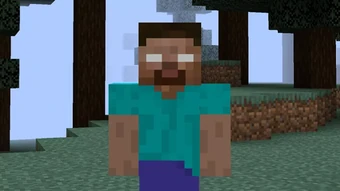
Steve is perhaps the most recognizable character in all of gaming. Even people who have never played Minecraft can recognize him as the face of the game. Yet, despite his universal fame, the story behind his name and origins remained a mystery for nearly 15 years. Surprisingly, Markus “Notch” Persson, the creator of Minecraft, never officially named Steve—so how did he get his name?
The Earliest Appearance of Steve
Steve first appeared in Minecraft on May 13, 2009, during the game’s pre-classic version. Minecraft was nothing more than a simple, blocky world with a floating island and basic terrain at this stage. This version introduced the first mobs, which looked like a humanoid figure with a greenish hue. While this mob resembled a zombie, it was never officially named. The texture for the character actually came from another unfinished game Notch was working on called Zombie Town.
A few weeks later, on May 31, 2009, Minecraft Classic 0.0.15a was released. This version introduced multiplayer, requiring an actual player model for the first time. Instead of designing a new character from scratch, Notch simply repurposed the existing mob model. The default skin we now recognize as Steve was born—but at this time, he had no official name.
The Forgotten Player Models: Beast Boy, Black Steve, and Steve
In January 2010, Notch added three new models to the game: Beast Boy, Black Steve, and Steve. These models were created by a game designer named Dock, who briefly collaborated with Notch during Minecraft’s early development. They were added as mob skins but removed just two days later. However, this marks the first known instance of the name “Steve” appearing in Minecraft.
The key question is: where did the names come from? The game files didn’t include them, and neither Notch nor Dock officially named them. The answer lies in an old online chat platform called IRC, which was widely used by early Minecraft players.
The True Origin of Steve’s Name
An anonymous player named “A” decided to investigate this mystery by sifting through old Minecraft IRC logs and forum posts. In these logs, dating back to early 2010, a player named SEO casually referred to one of the new models as “Black Steve.” Shortly after, another player called the original skin “White Steve.” Over time, players simply started calling the default character “Steve.” Notch himself was present in these chatrooms and likely saw the nickname gaining popularity.
Despite this, the name “Steve” didn’t become official until October 24, 2010, when Notch made a Tumblr post referring to the default Minecraft character as “Steve?”—even he seemed uncertain about the name. But from that moment on, the name stuck. Forum discussions, community projects, and even early Minecraft creepypastas reinforced “Steve” as the character’s official name.
A Name Born from a Random Chat
It’s fascinating to think that one offhand comment in an IRC chatroom led to the naming of one of the most iconic gaming characters of all time. The Steve we all recognize today owes his name to a casual joke made by early Minecraft players—and possibly a moment of indecision from Notch himself.
The journey of Steve’s name is a testament to how gaming communities shape the culture of a game. What started as an unplanned, temporary model turned into one of the most famous video game characters in history.
So the next time you see Steve mining away in a world of blocks, remember: he wasn’t named by a developer, nor was he created with an identity in mind. Steve is the result of a community-driven legend, a name that emerged organically from the players themselves.
Trying Minecraft’s New Update 1.22: A Deep Dive into the Latest Features

Minecraft’s latest update has finally arrived, bringing a host of new features, mobs, and mechanics that are sure to change the way players experience the game. Whether you’re a builder, an explorer, or just someone who enjoys the simple joys of survival mode, there’s something in this update for everyone. Let’s take a closer look at what’s new!
New Mobs: Fresh Faces in the Overworld
One of the biggest highlights of the update is the introduction of new mobs. The update introduces a brand-new chicken variant, featuring different colors and unique appearances. Players can now encounter brown and blue chickens alongside the traditional white ones. While these variations don’t change gameplay drastically, they add a nice touch of diversity to Minecraft’s wildlife.
Another new addition is the Savannah Cow, a breed that thrives in the game’s savanna biome. These cows feature a unique spotted design and, much like their standard counterparts, provide leather and beef when defeated.
Improved Environment and Interactive Nature
One of the more subtle yet exciting changes in this update is the Leaf Litter Mechanic. When standing beneath trees, players may notice leaves occasionally falling from the canopy, creating a more immersive and natural feel to forest environments. This small but significant touch enhances realism while maintaining Minecraft’s signature aesthetic.
Additionally, the desert biome has received a minor but meaningful update with the introduction of Desert Grass. This plant can be grown using bone meal and serves as decorative vegetation, adding more life to otherwise barren landscapes.
New Decorative Blocks and Items
For builders, the update brings a range of new decorative items. Among them is the Resin Block, which is obtained by smelting a new material called Resin Clump. This new resource can be found in Woodland Mansions and as loot from certain mobs. While its main function is decorative, it opens up new possibilities for creative builds.
The update also includes the Cactus Flower, which has a small chance of spawning on tall cacti. While its primary use is crafting pink dye, it adds a nice visual flair to desert biomes.
Enhanced Crafting and Survival Mechanics
A major gameplay feature added in this update is a refined crafting system that introduces randomized breeding mechanics for mobs. Players attempting to breed Savannah Cows or the new chickens will notice a 50/50 chance of getting different color variations, making animal farming a little more unpredictable and exciting.
Another small but notable change is the slight variation in grass textures, making landscapes feel more diverse and visually appealing.
Lighting and Atmospheric Enhancements
For those who appreciate ambiance, the update introduces Fireflies, which appear in certain biomes at night. These glowing insects add a new level of immersion, creating peaceful nighttime settings. Players can also use blocks to dampen the sound of crickets and other ambient noises, giving them more control over their in-game experience.
Final Thoughts: Is This Update Worth It?
While this update doesn’t introduce any game-changing mechanics, it does bring a host of small improvements that enhance Minecraft’s world-building and survival aspects. From new mob variations to improved lighting and environmental changes, it adds a fresh layer of detail and realism to the game.
If you’re someone who enjoys the finer details in Minecraft, this update is definitely worth exploring. What do you think of these new features? Let us know in the comments!
Best Skibidi Toilet Mod for Minecraft PE
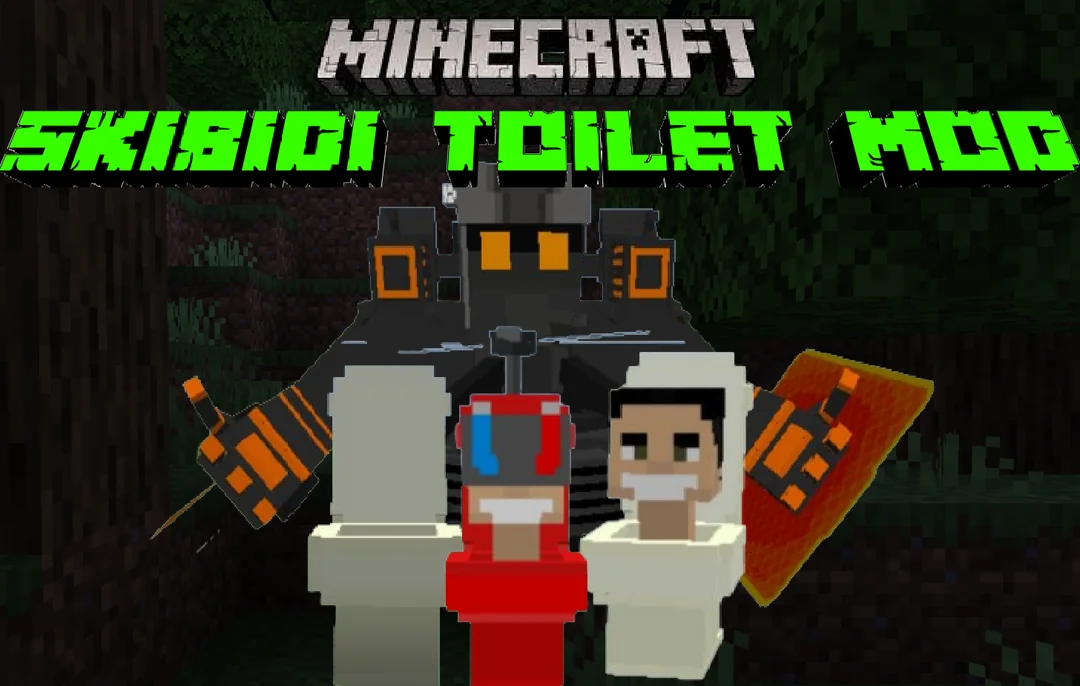
If you’re a Minecraft PE player who loves bizarre and entertaining mods, then the Skibidi Toilet Mod for Minecraft PE is a must-try! This addon brings a hilarious twist to your game by introducing quirky characters inspired by a viral animated series. Whether you want to add some unexpected chaos or just enjoy the fun of encountering these unique mobs, this mod is packed with surprises.
What’s Included in the Skibidi Toilet Mod?
The Skibidi Toilet Mod for Minecraft PE introduces three unusual mobs based on characters from the popular Skibidi Toilet series. Each one has its own look and characteristics, ensuring a lively and unpredictable gameplay experience. If you enjoy mixing mods, you can also pair this with other mob-based add-ons to create even more hilarious interactions in your world.
Key Features of the Skibidi Toilet Mod
For players familiar with the viral Skibidi Toilet videos, the highlight of this mod is that the Skibidi Toilet creature plays music—just like in the original clips! As soon as this mob appears in the game, the iconic soundtrack kicks in, making the experience feel even more authentic.
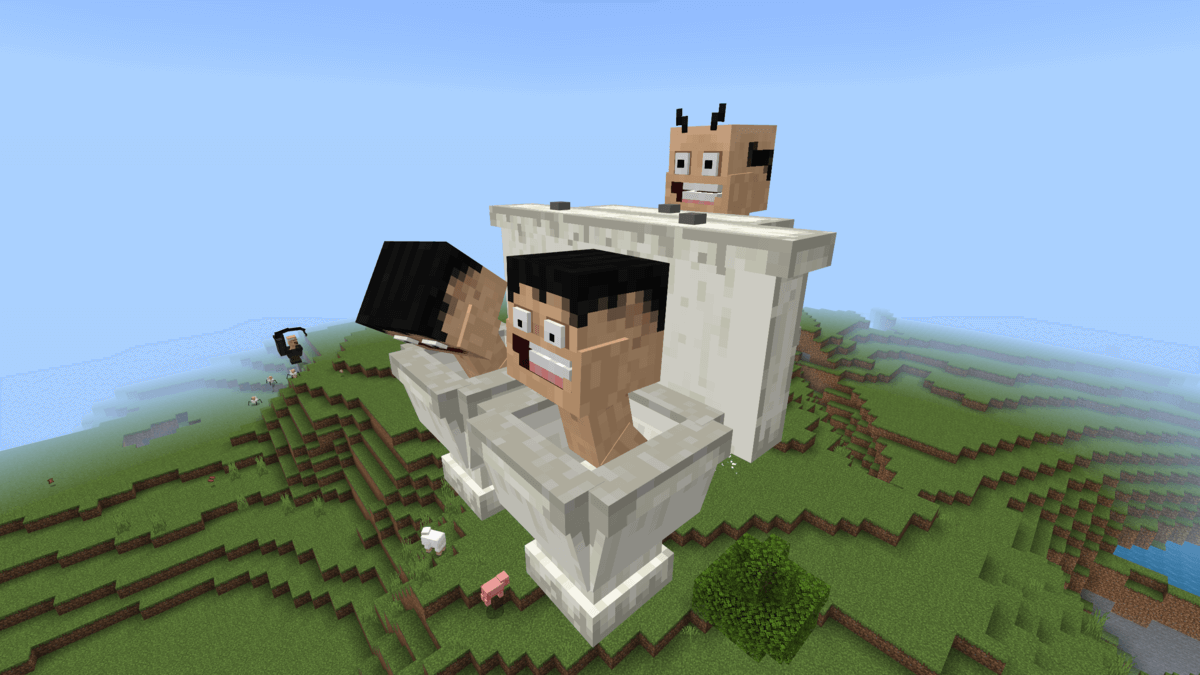
To ensure everything runs smoothly, be sure to enable experimental mode in your Minecraft settings before using this mod.
Meet the New Skibidi-Inspired Mobs
This mod introduces several new mobs that bring humor and excitement to the game:
- Skibidi Toilet Small – A miniature but amusing version of the character.
- Camera-man – A passive mob that follows players around without attacking.
- Speaker-man – Similar to Camera-man, this character is also non-aggressive.
You can spawn these creatures using eggs available in the inventory. A fun fact about the Skibidi Toilet mob is that it doesn’t drown in water, making it a persistent presence wherever you go.
Unique Abilities and Special Features
While these mobs don’t have complex AI behavior, they do offer some entertaining functionalities. The Skibidi Toilet creature plays its signature track multiple times. If you move closer, the music will restart, allowing you to enjoy the theme as often as you like.
Additional Skibidi Characters
This mod goes beyond the basic Skibidi Toilet mobs and introduces more characters to expand the fun:
Titan Speakerman
A massive and powerful character, Titan Speakerman stands out with his large build, red jacket, and black pants. This formidable figure adds an extra layer of excitement and variety to the mod.
Skibidi Dip Dop
Fans of the Skibidi Toilet videos will love this addition, as it brings larger-than-life mobs inspired by favorite characters. These creatures can be spawned manually using eggs, and some will even battle each other, making gameplay more unpredictable.
New Skibidi-Themed Mobs
Want even more Skibidi-inspired characters? This addon introduces additional creatures that retain the essence of the original videos while offering fresh experiences for Minecraft PE players.
Skibidi Raids
For an added challenge, this Skibidi-themed expansion features over 100 new items and mobs. It works seamlessly in any Minecraft PE world, making survival mode even more thrilling.
Download Links
Ready to install the Skibidi Toilet Mod for Minecraft PE? Choose from the versions below and download the mod files (all links are set to “nofollow” for security purposes).
| Name | Version | File |
|---|---|---|
| Skibidi Toilet | 1.19.0 – 1.21.51 | Download |
| Titan Speakerman | 1.19.0 – 1.21.51 | Download |
| Skibidi Dip Dop | 1.20.0 – 1.21.51 | Download |
| New Skibidi Characters | 1.20.0 – 1.21.51 | Download |
| Skibidi Raids | 1.21.0 – 1.21.51 | Download |
Installation and Troubleshooting
To install the Skibidi Toilet Mod for Minecraft PE, simply download the mod file to your device and open it with Minecraft Bedrock Edition—it will install automatically. If the mod isn’t working, double-check that Experimental Mode is enabled in your settings, as this is essential for proper functionality. Additionally, this mod fully supports multiplayer gameplay, so you can enjoy the chaos with friends in your Minecraft world!
Minecraft’s Latest Update: New Biomes, Features, and Much More!

Minecraft continues to evolve, with the latest update bringing exciting changes and new features. Mojang has rolled out fresh updates in the Minecraft Bedrock Edition, including new biomes, improved structures, and interactive elements that promise to enhance gameplay. Whether you’re exploring the updates for the first time or are a seasoned player, there’s a lot to explore. Let’s dive into the key highlights of the new changes!
Introducing New Biomes and Changes to Existing Ones
One of the most notable aspects of the new Minecraft update is the expansion of biomes. The Overworld is seeing significant transformations, with biomes such as the Dark Oak Forest getting a makeover. Expect denser dark oak trees and fewer birch or oak trees in these areas. This change helps the biome live up to its name by making it darker and more mysterious. Along with this, there’s a new texture for the leaves, enhancing the visual appeal.
On top of that, the update adds new plants like the Wild Flower. These flowers have an organic, multi-block design that’s quite similar to the cherry blossom trees. Players can interact with these flowers by using bone meal, which allows them to grow into a stunning display of vibrant blooms. This small addition helps give the game world a more realistic feel, especially for those who love exploring different terrains.
Exciting New Features: Firefly Bushes and More
Another fascinating feature is the Firefly Bush, which makes its way into the game with this update. These bushes emit glowing particles at night, offering a serene and almost magical atmosphere in swamp and river biomes. If you’re a fan of small details that elevate the environment, the Firefly Bush is definitely worth checking out. You can even use bone meal to grow more of them, spreading their glowing effect across your world.
Also, the update introduces leaf litter, a new block found in forests, especially in the Dark Oak biome. Players can walk on these and hear a satisfying crunching sound, adding a touch of realism to forest exploration. While you can’t craft them directly, they generate naturally, making the terrain feel more alive.
A Sneak Peek Into Future Updates
With each Minecraft update, players always wonder what’s coming next. This time, there are hints that Mojang may be preparing for even bigger changes to world generation. Leaked information about starter seeds in the code suggests that there could be new biomes or even structures coming soon. Typically, starter seeds are linked to major world generation changes, so the appearance of these seeds hints at something significant down the line.
Though we don’t have full details just yet, it’s safe to say that Mojang is working hard to deliver even more exciting features in the future. Players can expect more immersive updates that continue to refine and enhance the Minecraft experience.
Cow Variants: Cold vs. Warm
In this update, cows have also received a visual upgrade. Cold and Warm Cow variants have been introduced, adding some variety to the familiar creatures. The cold variant is adapted for colder climates, with a fluffy appearance to help it survive in harsher conditions. On the other hand, the warm variant thrives in warmer biomes and has a distinct brown coat and horns. These new mobs add another layer of depth to the game’s environmental interactions.
Interestingly, when these cows are bred, the offspring’s variant is randomly selected, adding a fun element of unpredictability to the process. This new feature encourages players to experiment with breeding and explore the different possibilities.
What’s Next for Minecraft?
As the update continues to unfold, players can look forward to even more changes. The update is still in its early stages, but the new features are already proving to be worthwhile additions to the game. There’s talk of even more biome changes and new structures coming soon, which could drastically alter the landscape of Minecraft. As time goes on, Mojang is sure to provide more updates and teasers, keeping the community engaged and excited.
In conclusion, the Minecraft update brings a variety of changes that enhance the gameplay experience. From new biomes and plants to new cow variants and mysterious hints about upcoming features, there’s plenty for players to explore. Whether you’re a casual player or a Minecraft enthusiast, this update is one to dive into. Keep an eye out for future updates, as Mojang continues to surprise with exciting content.
Minecraft Snapshot Update: New Cow Variants, Firefly Bush, and More

Minecraft fans have plenty to look forward to with the latest update, Snapshot 25w05a. This update introduces a variety of new features, from unique cow variants to atmospheric changes in the desert biome. It’s clear that Mojang continues to focus on enhancing the game’s immersive qualities. Below is a breakdown of the exciting updates in this version.
New Cow Variants
One of the standout features in Snapshot 25w05a is the introduction of two new cow variants. This change adds more diversity to the animal mobs, which is sure to spark the interest of players. Here’s a closer look at these new variants:
- Cold Cow: As the name suggests, Cold Cows are found in colder biomes. They have fluffy fur, which helps them survive in freezing environments, making them a unique addition to Minecraft’s wildlife.
- Warm Cow: In contrast, Warm Cows live in warmer climates. They appear as a brown version of the standard cow and feature horns.
Interestingly, when players breed these cows, the offspring’s variant isn’t determined by the biome it’s in. Instead, the variant is randomly selected from the two parent types. This offers a bit of unpredictability, which many players will enjoy.
The Firefly Bush
In addition to the new cow variants, the Snapshot update introduces the firefly bush, a decorative block that can be found near rivers and in swamps. This bush has a distinct feature: it emits glowing firefly particles at night, creating a calm and peaceful ambiance. If you use bone meal on the firefly bush, you’ll get another firefly bush, allowing for some simple yet beautiful environmental decoration. It’s a small but delightful addition to the game’s flora.
Read also: 20 Minecraft Mobs and Their Surprising Weaknesses
Ambient Sounds in the Desert Biome
Minecraft’s desert biome has also received an upgrade in the latest update. Now, players will hear new ambient sounds that help bring the desert to life. The inclusion of these sounds makes the environment feel more dynamic and realistic. Here’s a look at some of the new sounds:
- Crickets Chirping: This subtle background noise helps set a calm atmosphere.
- Rustling Twigs and Howling Winds: These sounds further enhance the feeling of being in a vast, empty desert landscape.
These audio additions don’t drastically change gameplay but certainly improve the overall atmosphere, adding to the realism of the game world.
Additional Updates
Alongside the major features, Snapshot 25w05a also brings several smaller updates, further enriching Minecraft’s world:
- Bush Blocks: A new type of decorative block, the bush block, appears in small patches across various biomes, including forests, plains, and windswept hills. These blocks add more variety to the environment and can be used for aesthetic purposes.
- Dead Bush Sounds: Dead bush blocks, when placed on top of terracotta, sand, or red sand blocks, now have a chance of emitting ambient sounds. This adds another layer of detail to the desert and similar biomes, where players often encounter dead bushes.
Final Thoughts
These new features in Minecraft Snapshot Update 25w05a highlight the game’s ongoing evolution. From new mob variants to atmospheric changes, it’s clear that Mojang continues to focus on small but meaningful updates that enhance the player’s experience. Whether you’re exploring new biomes, breeding cows, or simply enjoying the ambient sounds, these updates add a fresh layer of depth to the world of Minecraft.
As always, Minecraft remains a dynamic game, with regular updates ensuring it stays exciting and engaging for players around the world.
Big W and Woolies to Release Exclusive Minecraft Collectibles Featuring Eco-Friendly Materials
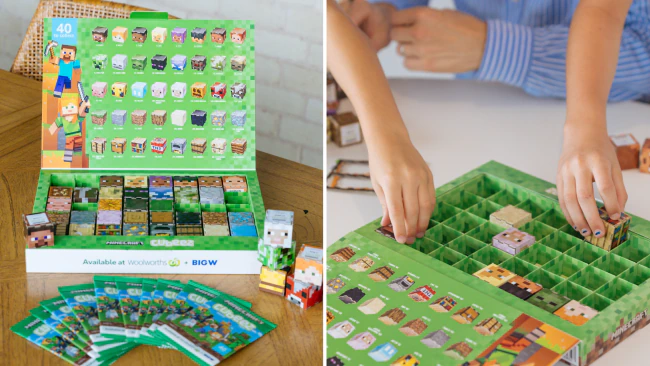
Minecraft continues to capture the imaginations of millions worldwide, and now, two major Australian retailers are stepping up their game. Big W and Woolworths (Woolies) are set to launch a new collection of Minecraft-themed collectibles.
These items promise to delight fans by offering unique, game-inspired toys made from recyclable materials. Not only do these items tap into the game’s massive fanbase, but they also align with the growing trend of sustainability in product design.
What Can Fans Expect?
The new collectibles are designed with Minecraft enthusiasts in mind. While specifics of the toys remain under wraps, one thing is clear: the items will reflect the popular elements from the game, such as characters and iconic items, while promoting eco-friendly materials. These features make the collectible range both exciting and environmentally conscious.
Where and When Can You Get Them?
Big W and Woolworths will feature these Minecraft collectibles as part of special promotions. While exact launch dates are still to be confirmed, the anticipation is building.
Fans of the game can expect these items to be available at various points of sale, making it easier than ever to add these collectibles to their collection.
Minecraft’s Cross-Promotional Power
This collaboration highlights Minecraft’s ability to cross-promote with various brands and remain relevant in different retail markets. Over the years, the game has extended its influence well beyond the screen, partnering with a variety of brands for unique products.
Big W and Woolworths’ involvement is just another example of how Minecraft continues to shape the retail landscape, blending entertainment and consumer products seamlessly.
Why This Launch Matters
The launch of these Minecraft collectibles reflects the continuing popularity of the game. Additionally, with its commitment to using recyclable materials, it signals a shift toward more environmentally responsible products in the gaming industry.
Whether you’re a collector, a Minecraft fan, or someone who enjoys unique and sustainable toys, this new range is certainly one to watch.
20 Easy Ideas to Do When Bored in Minecraft
Minecraft is a world full of creativity and endless possibilities, but even the most avid players sometimes find themselves wondering what to do next. If you’re feeling uninspired, here are 20 detailed ideas to spark your creativity and keep the boredom at bay.
- Build a Hidden Base
Challenge yourself to create a hidden base, either underground, underwater or within a mountain. Use Redstone to design secret doors, like piston-operated entrances or trapdoors. Incorporate hidden rooms, treasure vaults, and even tunnels connecting to the surface. Not only will it be a fun project, but it’s also practical for keeping your resources safe in survival mode. - Create a Theme Park
Transform your Minecraft world into a bustling theme park with roller coasters, water slides, and mini-games. Use minecarts for the roller coasters and add creative elements like loop-de-loops or underwater rides. Include carnival stalls where you can set up games with prizes, and invite friends to join in the fun. - Explore New Biomes and Structures
Minecraft’s world generation is vast, offering everything from deserts to frozen tundras. Set out on an adventure to discover rare biomes like mushroom fields or locate structures such as woodland mansions, ocean monuments, and ancient cities. Bring a map and plenty of supplies to make your journey easier. - Build Pixel Art
Recreate your favorite characters, logos, or symbols using Minecraft blocks. Start with a simple design, like a heart, and gradually attempt more complex images. You can even turn pixel art into wall decorations for your base, adding a personalized touch to your world. - Create a Mob Zoo
Turn your world into a safari experience by building enclosures for different mobs. Capture zombies, creepers, or even rare mobs like skeleton horses. Add themed environments for each enclosure to mimic their natural habitats. This is a fun challenge that also helps you practice handling mobs safely. - Construct a Giant Statue
Put your building skills to the test by designing a massive statue. It could be a representation of yourself, a favorite game character, or an abstract design. Use different materials like wool for color or stone for a classic look. The larger the statue, the more intricate details you can include. - Set Up a Trading Hall
Gather villagers and create a fully functional trading hall. Use job blocks like lecterns or smithing tables to assign professions and unlock useful trades. Decorate the hall to look like a bustling market or futuristic hub. This is not only a great long-term project but also a way to gain valuable resources like enchanted books or emeralds. - Try Minecraft Challenges
Take on exciting challenges to spice up your gameplay. Examples include surviving on a one-block island, creating a hardcore survival world, or speedrunning to defeat the Ender Dragon. These challenges test your skills and add an element of urgency to the game. - Build a Working Redstone Elevator
Learn the basics of redstone by constructing an elevator. Start with a simple piston elevator, then advance to a more complex flying machine. Once you’ve mastered it, you’ll feel accomplished and can use your elevator in other projects like skyscrapers or mines. - Create a Custom Parkour Course
Design a parkour course with obstacles like slime blocks, ladders, and narrow ledges. Add checkpoints and signs with encouraging messages to make it more fun. Test your course yourself or challenge friends to complete it as quickly as possible. - Recreate a Real-Life Landmark
Pick a famous landmark like the Eiffel Tower or the Pyramids of Giza and recreate it in your Minecraft world. Use photos or online blueprints as references to ensure accuracy. This project allows you to practice planning and scaling large builds. - Start a Survival Island Challenge
Generate a new world using an island seed and see how long you can survive. Begin with limited resources, build a shelter, and expand your island by farming and fishing. This is one of the most immersive ways to rediscover the basics of survival mode. - Host a Building Competition
If you’re in multiplayer mode, organize a building competition. Choose a theme like “futuristic skyscraper” or “medieval village” and set a timer. Afterward, compare builds and vote for the most creative structure. - Construct an Elaborate Bridge
Design a stunning bridge to connect two areas in your world. Experiment with materials like wood, stone, or glass, and incorporate arches or suspension cables for added flair. Bridges can be both functional and decorative, making them a satisfying project. - Build a Lighthouse
Add a nautical vibe to your world by constructing a lighthouse. Use glowstone, sea lanterns, or redstone lamps for the beacon. Place it near a coast or on a small island to guide ships or simply serve as a striking landmark. - Develop a Massive Farm
Expand your farming capabilities by creating a large-scale farm. Plant crops like wheat, carrots, and potatoes, and add pens for animals. If you’re feeling ambitious, design an automatic farming system using redstone to harvest crops or collect eggs and milk. - Collect Rare Items
Challenge yourself to collect rare items like enchanted golden apples, netherite ingots, and wither skulls. Create a trophy room to display your findings and use item frames to showcase your achievements. - Make a Castle
A castle is a classic Minecraft project that lets you flex your building skills. Include features like a throne room, dungeons, and watchtowers. Use materials like stone bricks for a traditional look or quartz for a modern twist. - Design a Maze
Create a challenging maze with hidden traps, treasure rooms, and multiple exits. Add challenges like parkour sections or puzzles to make it even more engaging. Test your maze yourself or invite others to solve it. - Build a Floating Island
Construct a floating island high above the ground. Include a house, a garden, and even a small waterfall flowing down to the surface below. This project combines creativity with resourcefulness, making it a satisfying long-term goal.
These 20 ideas cover a range of activities to help you beat boredom in Minecraft. Whether you’re exploring, building, or experimenting with Redstone, there’s something for everyone. So, grab your pickaxe and start creating—you might just discover a new favorite project!
20 Minecraft Things That Are Totally Broken
Minecraft is a game full of creativity and surprises, but it’s not without its quirks. Over the years, players have uncovered many glitches, bugs, and unintended features that make the game even more fascinating. From visual oddities to mechanical exploits, here are 20 broken things in Minecraft that have puzzled and entertained players.
1. Immovable Clouds That Follow You
In version 20W22A, Minecraft’s clouds stopped behaving as expected. If you toggled clouds off and then back on, they would freeze in place. However, as soon as the player moved, the clouds would eerily follow their every step. This strange glitch created an almost supernatural atmosphere, as if the world itself was watching you. While purely visual, it’s a great reminder of how even small bugs can leave a big impression.
2. Infinite Redstone Signals from Cake
In one of the more peculiar redstone glitches, eating a slice of cake while it’s connected to a comparator can create an infinite redstone signal. This happens because the block update required to stop the signal never triggers unless you physically interact with the setup. For redstone enthusiasts, this is a fun trick, but it’s far from how cake is supposed to work.
3. Creepers Can’t Explode at Build Height
At the maximum build height (Y-level 320), explosions simply don’t work. Whether it’s a Creeper, TNT, or a bed in the Nether, the game’s mechanics fail to calculate blast resistance correctly at this altitude. As a result, any explosive effects are nullified, leaving players safe from destruction. This quirk may be unintentional, but it’s a handy feature for builders who want to avoid accidental explosions.
4. Transparent Water Through Glass
In Bedrock Edition 1.19.2, placing a glass block or item in water can make the water appear completely transparent when viewed through the glass. This visual bug turns bodies of water into invisible voids, which can be useful for locating hidden structures like shipwrecks or buried treasure. While it’s not game-breaking, it’s a surprising and sometimes helpful oversight.
5. Shulker Boxes That Open Anywhere
Shulker boxes are meant to follow the rules of spatial logic, but they often don’t. You can open a Shulker box even when it’s completely surrounded by blocks. This creates bizarre visual effects, as the lid clips through solid objects. While this doesn’t break the game’s functionality, it’s a clear case of the mechanics not aligning with the visuals.
6. Duplicating Items with Bundles
Bundles, an experimental feature in certain snapshots, introduced an unexpected glitch. By using a bundle to pick up items from a crafting table, players could duplicate those items. For example, crafting a diamond block and then collecting the leftover diamonds with a bundle allowed players to end up with both the block and the original diamonds. It’s a dream for resource hoarders but definitely unintended.
7. Wardens vs. Ender Dragon
The Warden is one of Minecraft’s strongest mobs, but even it struggles against the Ender Dragon. When Wardens attempt to attack the dragon, their sonic booms fail to inflict damage. However, the combined force of multiple Wardens can knock the dragon off its flight path, creating chaotic battles that feel more like a glitchy spectacle than an intended feature.
8. Fireworks Can’t Hurt Endermen
Firework rockets, launched from crossbows, are effective against most mobs. However, Endermen seem immune. The explosions fail to damage them, and they simply teleport away. This odd interaction raises questions about whether it’s a bug or an intentional design choice. Either way, it makes fighting Endermen with fireworks frustratingly ineffective.
9. Walking on the Void
In Bedrock Edition, the void beneath the world has an invisible floor. By using enchanted golden apples and proper timing, players can survive the drop and walk on this hidden layer. While there’s little practical use for this glitch, it’s a fascinating quirk that adds another layer of mystery to Minecraft’s mechanics.
10. Mangrove Trees Breaking Blocks
Mangrove trees have unique root systems that interact with blocks differently. If you plant a mangrove propagule and grow it with bone meal under a solid cube of mud, the tree’s roots will break through the mud blocks above it. This interaction was likely overlooked during development, as it’s a rare scenario. Still, it’s a fun detail for players experimenting with mangrove trees.
11. Striders Warm Up in Powdered Snow
Striders, which are normally cold when removed from lava, regain their warmth when placed in powdered snow—but only in Bedrock Edition. This interaction makes no logical sense, as powdered snow is freezing. The glitch adds a humorous contradiction to the game’s usual consistency.
12. Speed Boosting Boats
Boats have always been fast on ice, but a Bedrock glitch allows players to store potential energy in boats. After repeated jumps, sitting in the boat will launch you into the sky. This unintended feature turns boats into makeshift rockets, adding a chaotic and entertaining twist to transportation.
13. Unbreakable Blocks at the Nether Roof
Using dripstone plants and bone meal, players can destroy bedrock blocks in specific conditions. By growing large plants underneath bedrock, the game glitches and removes the unbreakable block. This exploit allows players to access the Nether roof, creating unique opportunities for building and exploration.
14. Elytra Hovering with Scaffolding
Elytra wings are meant for flying, but a glitch involving scaffolding allows players to hover in mid-air. By rapidly placing and breaking scaffolding while wearing Elytra, players can maintain a stationary position, which is useful for precision tasks like building or mining.
15. Invisible Waterlogged Blocks
In Bedrock Edition, certain blocks like glass appear waterlogged when placed inside bubble columns. However, this is purely a visual glitch, as the blocks aren’t actually waterlogged. The odd appearance can confuse players, but it’s harmless once the blocks are updated or removed.
16. Snow Golems as Flamethrowers
In Bedrock Edition, snowballs can catch fire when thrown through lava. By placing snow golems near Nether blocks, players can turn their friendly snowmen into fire-spewing defenders. This accidental feature adds a creative way to protect bases, even if it defies logic.
17. Horses Breeding for Super Speed
Using potions of swiftness and jump boost on horses before breeding passes those effects to their offspring. Over generations, this glitch can produce horses with absurd speed and jumping abilities, making them more effective than any other mount in the game.
18. Infinite Lava with Glow Lichen
For a brief time, placing glow lichen in lava would turn it into water, allowing players to effectively create infinite water sources in the Nether. This oversight was quickly patched, but for a short period, it was a game-changing exploit for resourceful players.
19. Floating Sand and Gravel
Minecraft’s terrain generation sometimes creates floating sand and gravel blocks. While these should fall when unsupported, they remain suspended until updated. This quirk has been repurposed as a feature, with dust particles added to warn players of potential cave-ins.
20. TNT Duplication Machines
TNT duplication is one of Minecraft’s longest-standing glitches. By using slime blocks, pistons, and coral fans, players can create machines that generate endless TNT. Mojang has left this feature in the game, as it’s essential for large-scale builds and automation, even if it’s technically a bug.
Minecraft’s broken features may not always align with the developers’ intentions, but they’ve added layers of creativity and fun to the game. These quirks remind us that even in a carefully designed world, imperfections can lead to unexpected opportunities.
Busting Scary Minecraft Myths That Are Actually Real
Minecraft is filled with creativity, exploration, and endless fun, but it’s also home to myths that send shivers down players’ spines. Over the years, players have whispered tales of haunting glitches, cursed mobs, and terrifying entities lurking in their worlds. Some of these myths seem too bizarre to be true—yet a few of them are surprisingly real. Here, we’ll dive into some of the most chilling Minecraft myths and uncover whether there’s truth to the stories.
The Legend of the Half-Eaten Armadillo
One of the eeriest myths comes from the introduction of the armadillo mob. While these creatures are meant to be peaceful, some players have reported encountering a horrifying version of this mob: the half-eaten armadillo. The story goes that if you manage to crash your game at the exact moment an armadillo dies, you might create a glitched version of the mob.
This “half-eaten” armadillo is said to wander the world, attacking animals and leaving them mutilated. Sheep lose their wool, pigs become lopsided, and even cows appear frozen in place, missing parts of their bodies. Some players claim that these strange occurrences are evidence of the half-eaten armadillo’s existence. However, reproducing this glitch is incredibly difficult, leaving the myth shrouded in mystery.
The Blood Bulb Phenomenon
The “blood bulb” is a chilling nickname for a supposedly cursed block that resembles oxidized copper bulbs. According to players, if you duplicate a world save, delete the entity files, and interact with the bulbs using redstone, they can transform into horrifying, glowing objects.
Reports describe these bulbs “bleeding into the world,” corrupting everything they touch. Some players even claim to have seen ominous messages appear in the chat or experienced crashes that forced them to restart their games. While these accounts are difficult to verify, they’ve fueled widespread speculation about the true nature of the blood bulb.
Tick Commands That Summon Darkness
Commands are a powerful tool in Minecraft, but they can also lead to unintended consequences. A myth has circulated about the use of specific commands, such as /tick freeze and /tick unfreeze, to manipulate time in the game. When performed in a precise sequence, these commands are rumored to summon a shadowy mob that follows players and watches their every move.
Players who have experimented with this command report seeing their games slow to a crawl, mobs freezing in mid-air, and ominous figures appearing in the distance. While these events could be glitches or overactive imaginations, the unsettling nature of the myth has kept it alive.
Floating Mobs and Ghostly Behavior
Another terrifying myth involves mobs behaving in bizarre, unexplainable ways. Players have shared accounts of encountering mobs that appear to be “floating” or frozen, staring blankly without responding to their surroundings. These ghostly behaviors are often attributed to corrupted world files or glitches in mob spawning mechanics.
In one famous case, a player described following a pig that walked in a straight line for miles, seemingly leading them to a deserted pillager outpost. Upon arrival, the outpost was eerily empty, with no pillagers in sight—only a trail of damaged mobs left behind.
The Mysterious Red Entity
A relatively recent myth involves a so-called “red entity” linked to glitched redstone mechanics. According to reports, if you overload your redstone contraptions and trigger specific commands, the entity can spawn and wreak havoc. It’s said to destroy blocks, take control of mobs, and even crash the game entirely.
Some players claim to have seen this entity emerge after interacting with corrupted redstone builds, describing it as a glowing, ominous figure. However, no concrete evidence exists to confirm its presence, leaving the story firmly in the realm of myth.
Are These Myths Real?
Minecraft myths like these thrive because they blend the game’s complex mechanics with the imagination of its players. While some myths can be explained as glitches or coincidences, others remain unexplained, adding to the game’s mystique. Whether or not you believe these tales, they certainly make Minecraft an even more intriguing world to explore.
What’s your take on these myths? Have you encountered anything strange in your Minecraft world? Share your experiences and theories in the comments!
Investigating Minecraft’s Strangest Deleted Versions
Since its release in 2011, Minecraft has seen over 600 updates, introducing new features, blocks, and mechanics. However, not every version made it into the final game. Some snapshots and updates were mysteriously removed, leaving fans wondering why Mojang deleted them and what secrets these versions might be hiding. Today, we’re diving into some of Minecraft’s strangest deleted versions to uncover their mysteries.
Snapshot 22w13: One Block at a Time
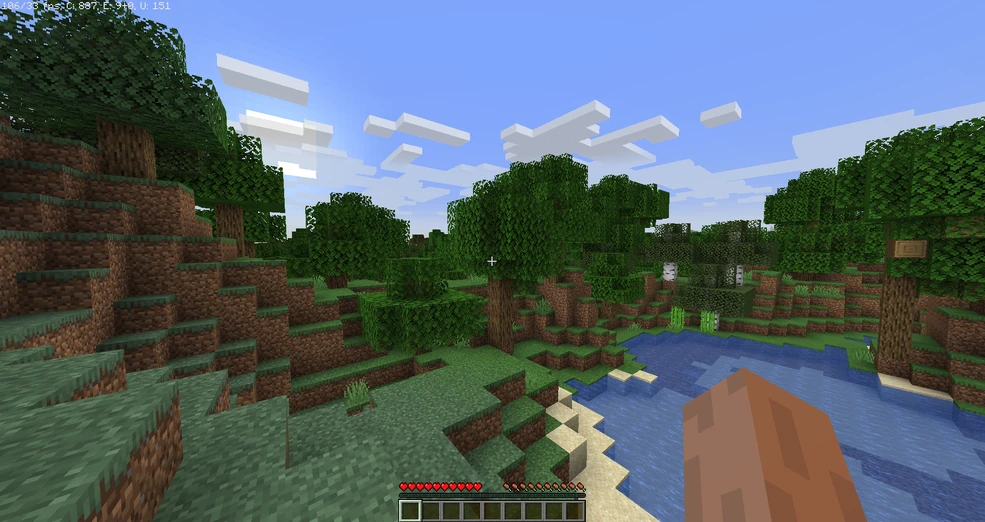
Snapshot 22w13 looks like a stripped-down version of Minecraft. But when you switch to first-person mode, things quickly get strange. In this version, players can only hold one block at a time, much like the Enderman mob. The hunger bar, hot bar, and inventory are entirely missing.
Holding a block feels odd, as it’s cradled between two hands in a way that’s entirely different from the standard Minecraft experience. Even picking up items like armor or tools offers no benefit—you can’t wear or use them. Breaking chests is equally bizarre, as they explode into a pile of blocks and items that you can only pick up one at a time.
But why would Mojang create such a version? Some speculate this snapshot was a test for a game mode where players would behave like mobs, specifically Endermen. Others suggest it was an experimental prototype for a scrapped Minecraft spin-off, possibly linked to the long-rumored Minecraft 2.0. Regardless, the version remains a puzzling anomaly, showcasing a game that’s far removed from the Minecraft we know.
Snapshot 13w38a: Super Secret Settings
Snapshot 13w38a introduced the infamous “Super Secret Settings” feature. Hidden in the settings menu, clicking it would activate experimental shaders that altered the game’s visuals. From upside-down worlds to blurry landscapes, the shaders made Minecraft look unrecognizable.
While the settings were fun to play with, they served no practical purpose, leaving many players confused. Adding to the mystery, some users reported that the shaders caused severe lag or even crashes, especially on older systems.
Why would Mojang include a feature that seemed intentionally broken? Some believe it was part of a marketing gimmick for a rumored sequel, Minecraft 2.0. Others think the shaders were an attempt to obscure distant fog and prevent players from spotting certain in-game secrets. Whatever the reason, the Super Secret Settings were quickly removed in later updates, leaving behind only questions.
Snapshot 14w17a: Custom Worlds and Creepy Bugs
Snapshot 14w17a gave players an unprecedented level of control over world generation with the “Customized World” option. Players could adjust settings like ore generation, biome size, and terrain height. Advanced options allowed for tweaking parameters like depth noise and biome weights, creating unique and surreal landscapes.
However, this snapshot was also plagued by strange bugs. Players reported seeing eerie black figures in their worlds—entities that didn’t resemble any known mobs. These shadowy figures appeared in screenshots, often blending into the environment but distinct enough to unsettle players.
Adding to the mystery, Mojang later removed the customized world option entirely, stating it caused compatibility issues. But many believe the removal had more to do with the unexplained glitches and Mojang’s desire to keep the game’s code clean and predictable.
Bedrock Preview 1.19.8.24: The Warden Core
In this unreleased Bedrock preview, a mysterious item known as the “Warden Core” made its debut. When players defeated a Warden, it dropped this flashing item, which reportedly activated the ancient city portal.
Players speculated this portal would lead to a new dimension, often referred to as the “Deep Dark Dimension.” Videos claimed to show players lighting the portal and stepping into a dark, ominous world. However, attempts to replicate these videos often failed, and Mojang never officially acknowledged the Warden Core’s existence.
Some theorize the Warden Core and the portal were part of an abandoned feature Mojang later replaced with the sculk catalyst. Others believe these rumors were elaborate hoaxes, using mods to fake the portal’s activation.
Theories Behind Minecraft’s Deleted Versions
Why does Mojang delete some versions of Minecraft? The most plausible explanation is that these snapshots were experimental, testing new mechanics that didn’t align with the game’s direction. However, some fans believe there’s more to the story.
One theory suggests Mojang used these versions to test features for a potential Minecraft 2.0, a rumored sequel that never materialized. Another idea is that certain snapshots were deliberately mysterious, designed to keep the community engaged in solving puzzles and uncovering hidden lore.
Finally, some believe these deleted versions were simply mistakes—unfinished ideas that Mojang realized didn’t belong in the final game. Regardless of the truth, these versions remain a fascinating glimpse into the experimental side of Minecraft’s development.
From snapshots that turn players into Endermen to secret settings that invert the world, Minecraft’s deleted versions are full of oddities. While some of these updates were likely scrapped for technical reasons, others leave behind lingering mysteries that continue to intrigue players.
What do you think about these strange versions? Were they just experiments gone wrong, or was Mojang hiding something more significant? Let us know your theories as we continue to uncover the secrets of Minecraft’s forgotten updates.